

PDFs are everywhere in backend systems—from invoices and reports to scanned forms and archived records. But when these documents need to be previewed, indexed, analyzed, or displayed across different platforms, PDFs often aren’t the most convenient format to work with. Converting PDFs into images becomes a practical step in many backend workflows. When this process is handled manually or inconsistently, it quickly turns into a bottleneck. That’s why automating PDF to image conversion is no longer just a convenience—it’s a necessity for building scalable, reliable backend systems.
Why Backend Systems Still Need PDF-to-Image Conversion
PDF remains a common output format in backend systems because it preserves layout and works well for storage and sharing. However, many backend tasks do not interact with PDFs directly. Features like document previews, page thumbnails, OCR processing, and content review are often easier to implement using images.
In these cases, converting PDF pages into images becomes a practical bridge between static documents and dynamic backend processes. Rather than replacing PDFs, image conversion extends how they can be used across different services and workflows.
Common Backend Scenarios That Require Automated PDF to Image Conversion
In many backend systems, PDF-to-image conversion is not an occasional task but a recurring part of the workflow. For example:
- Document management systems often generate image previews so users can quickly view PDF pages without downloading the entire file.
- Invoice, contract, or report processing: Finance teams automate extraction; convert pages to images before feeding into OCR for data entry or fraud checks.
- API services with on-demand generation: A REST endpoint takes a PDF upload, converts it, and returns image URLs for embedding in emails or reports.
- Batch migrations or archiving: Moving historical docs to new storage, converting to images for faster web access, or compliance archiving.
In these scenarios, the ability to automate PDF-to-image conversion ensures consistency and keeps backend processes running smoothly.
Manual Conversion vs. Automated Workflows
When PDF-to-image conversion starts appearing frequently in backend processes, the differences between manual approaches and automated workflows become easier to see.
| Aspect | Manual/Half-Automated (Desktop Tools or Loose Scripts) | Automated Backend Workflows |
| Stability & Consistency | Results may vary depending on tools or input files | Uses consistent settings across all documents |
| Performance & Concurrency | Often slow and resource-intensive | Optimized for backend execution and throughput |
| Error Handling & Logging | Crashes silently or manual retries | Errors can be logged, retried, or routed automatically |
| Scalability | Difficult to handle large volumes or peak loads | Designed to process files in batches or in parallel |
| Maintainability | Scripts and tools become hard to manage over time | Easier to maintain as part of a structured workflow |
This comparison highlights why desktop tools and ad-hoc scripts often fall short once PDF-to-image conversion becomes a regular backend task. Automation turns it into a stable and predictable part of the system rather than a fragile workaround.
Key Things to Consider Before Automating
Before jumping in, weigh these practical factors:
Image quality and resolution – Balance fidelity (e.g., 300 DPI for crisp text) against file size—web thumbnails often do fine at 150-200 DPI.
Performance and resource usage – Large/multi-page PDFs consume memory; choose libraries that stream or process page-by-page.
No external software dependencies – Avoid tools needing Ghostscript or Poppler installations—pure managed .NET libraries deploy more easily to containers/cloud.
Integration with existing workflows – Look for NuGet packages that work seamlessly in ASP.NET Core services, support async, and handle streams/bytes directly.
These choices set you up for low-maintenance, production-ready code.
What an Automated Backend Workflow Looks Like
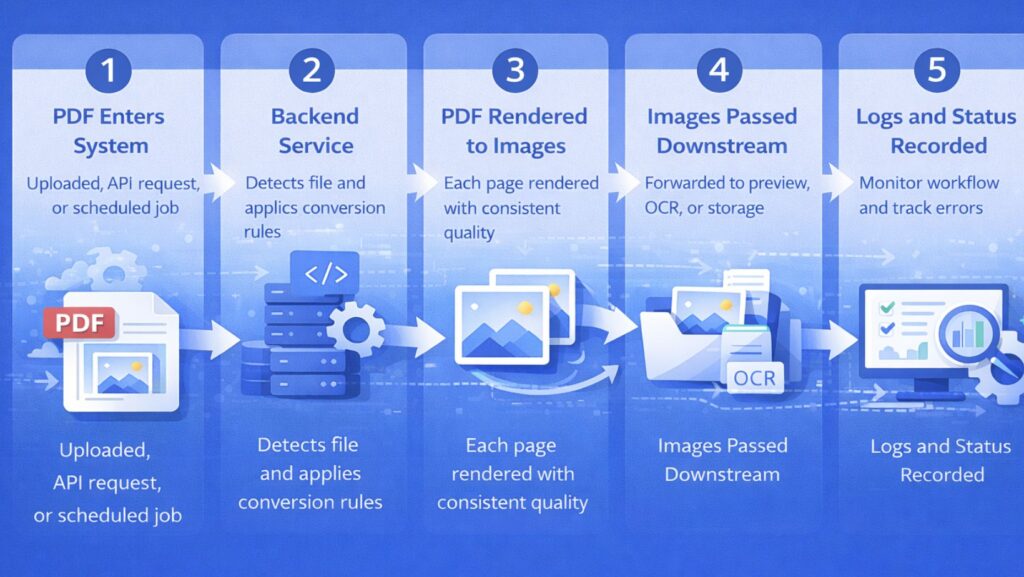
In an automated backend workflow, PDF-to-image conversion is treated as a standard processing step rather than a separate task. It follows a clear and repeatable process:
- A PDF file enters the system through an upload, API request, or scheduled job.
- The backend service detects the file and applies predefined conversion rules.
- Each page of the PDF is rendered into an image with consistent quality settings.
- The generated images are passed to downstream components such as preview services, OCR engines, or storage layers.
- Logs and status information are recorded to support monitoring and error handling.
Automating PDF to Image Conversion in .NET Projects
In .NET-based backend systems, PDF-to-image conversion is often implemented as part of a service layer or background task.
You can embed the conversion directly in:
- Web APIs for on-demand processing.
- Background services for batch jobs.
- Serverless setups supporting both single-file and high-volume runs.
One practical option in .NET ecosystems is Spire.PDF for .NET, which provides lightweight, dependency-free PDF rendering with consistent, high-quality output. It allows teams to centralize conversion logic, configure it once, and reuse it across multiple workflows—from single-request processing to large-scale batch jobs—helping backend services stay clean, maintainable, and scalable as document processing needs evolve.
Final Thoughts
PDF-to-image conversion is a small but important part of many backend workflows. When handled manually, it often becomes a source of inconsistency and technical debt. Treating it as an automated backend capability helps improve reliability, scalability, and long-term maintainability. With the right approach, PDF-to-image conversion can fit naturally into modern backend systems instead of becoming a recurring operational challenge.