


Key Takeaways
- Hyperliquid MCP is a model context protocol server enabling AI assistants to execute trades on the Hyperliquid exchange using the official hyperliquid python sdk.
- It supports real time market data, position management, and advanced order types like atomic bracket order placements with entry, take-profit, and stop loss.
- Users must register wallets on the hyperliquid blockchain (Testnet or Mainnet) and configure environment variables including their private key.
- Practical applications include conversational trading, automated risk management, and integration with tools like claude desktop.
- Security considerations include agent mode for key isolation and awareness of leveraged trading risks.
What Is Hyperliquid MCP?
Platforms building AI-native trading infrastructure are increasingly adopting the model context protocol standard. Trading automation platforms can integrate mcp server implementations to allow ai assistants to interact with exchanges through structured tool calls rather than fragile API prompts. This approach is also being explored by platforms like WunderTrading, which recently added MCP support for AI-driven automation.
Hyperliquid MCP is a model context protocol server that integrates AI agents with the hyperliquid exchange—a layer-one blockchain optimized for perpetual futures trading.

The server typically wraps the hyperliquid sdk to expose trading and data endpoints to MCP clients.
- Bridge between ai and the hyperliquid platform for 200+ assets including BTC, ETH, and SOL
- Handles request translation, signing, and error handling automatically
- Supports both Testnet for safe simulation and Mainnet for production trading
- Enables natural language prompts to execute trades and fetch market data
Core Features of a Hyperliquid MCP Server
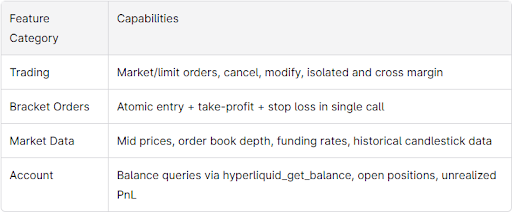
The hyperliquid mcp server exposes concrete capabilities through structured tools and endpoints:
Getting Started: Prerequisites and Wallet Registration
Follow these steps to configure your hyperliquid mcp setup:
- Create a hyperliquid account with an Ethereum-compatible wallet (MetaMask or hardware wallet)
- Register your wallet address on Hyperliquid via the official app—unregistered wallets trigger “User or API Wallet does not exist” errors
- For agent mode, configure a separate API wallet that signs on behalf of your trading wallet
- Start with Testnet at testnet.hyperliquid.xyz to validate configuration before enabling live trading activity
Environment Configuration and MCP Client Setup
Environment variables and client configuration are critical for secure MCP operation. Some variants use an env file while others allow direct UI configuration.
Typical variables include:
- HYPERLIQUID_PRIVATE_KEY (required for signing)
- Wallet address and network setting (mainnet/testnet, defaults to testnet)
- Optional agent wallet keys
For claude desktop on macos, edit ~/Library/Application Support/Claude/claude_desktop_config.json to register the server command and args. Check claude desktop logs if the mcp server isn’t discovered. Similar patterns apply for cursor and other IDE agents.
Using Hyperliquid MCP Tools in Practice
Query your hyperliquid account balance before trading to understand available margin and total equity. Fetch real time prices and order book depth using data tools. Place orders through natural language—the AI translates prompts into structured queries.
Example workflow:
- User: “Open a 5x long on ETH perps with 1% SL and 3% TP”
- AI calls bracket order tool with entry, stop loss, and take-profit parameters
- Server handles signing and execution atomically
Query open positions, adjust stops, or cancel orders using dedicated tools. Retrieve trade history for performance analysis.
Advanced Features: Agent Mode and Asset Index
Agent mode isolates keys by letting an API wallet sign for a main trading account—the AI cannot directly move all funds. Use hyperliquid_get_meta to resolve symbol ambiguities and discover new listings dynamically, enabling developers to build robust trading strategies.
Common Errors and Troubleshooting
- “User or API Wallet does not exist”: Register wallet on Testnet/Mainnet first
- “Order value must be at least $10”: Increase size so market price × quantity ≥ $10
- “Invalid signature”: Verify private key format and wallet registration
- Connectivity issues: Check node configuration, port conflicts, and debug logs
AI-Driven Use Cases Powered by Hyperliquid MCP
- Conversational trading: Natural language commands translated to MCP tool calls
- Intelligent risk management: AI monitors margin and volatility, suggesting position adjustments
- Portfolio automation: Rebalancing and exposure management across assets
- Research: Combining real time and historical data with ML models for backtesting
Security, Risk, and Best Practices
Store private keys securely and use Testnet first. Limit per-trade notional caps to prevent mis-prompts from overexposing your account. Rotate API wallets regularly and monitor logs for unusual trading activity.
Disclaimer: Perpetual futures trading on hyperliquid involves significant risk. Trade only what you can afford to lose.
Contributing and Ecosystem
Many hyperliquid mcp implementations are open source under MIT License. The community welcomes contributions—review GitHub repositories, submit issues, or add new tools. Fork repos, create feature branches, and open pull requests following documentation guidelines.
FAQ
Is Hyperliquid MCP only for perpetual futures?
Most implementations focus on perps since that’s Hyperliquid’s primary product. Check specific server documentation for spot market support.
Do I need a premium API key?
Core exchange APIs work with a registered wallet. Some third-party wrappers may have commercial tiers—verify before production use.
Can I run this on a VPS?
Yes—connect MCP clients remotely and secure the server with firewalls. Avoid exposing raw signing keys on shared machines.
How does it handle exchange downtime?
Robust servers include retry logic but cannot eliminate exchange-side issues. Implement timeouts and safe pause mechanisms in your strategies.
Can multiple AI tools share one wallet?
Technically possible, but increases coordination risk. Use separate wallets or agent-mode accounts to isolate different strategies.


